今日はReactのコンポーネントの話。
Reactで管理画面とか作っていると、検索画面って作るじゃない?
検索条件の入力フォームがあって、検索ボタンを押すと検索結果が表形式で出てくるようなやつ。
で、検索画面でHooksとかSWRとか使っていると、ロジックはHooksに移したくなってくる。 もっと言うと「検索画面」を抽象化して統一的なインターフェースで作ったら、いろんなエンティティのCRUD画面を作る必要がある管理画面で威力を発揮するかも…?とか
そんなことをぼんやり考えていて、そういえばロジックとUIの分離はContainer/Presentationパターンって方法があるなーとか、Container ComponentをHooksで表現するみたいなアプローチもあるなーとか思って、まあなんか書いてみるか。ってなった。
検索画面を抽象化するにあたって、 検索画面に必要なそうな要素を考えてみると、
- 検索条件
- 検索結果(結果リストまたはエラーリスト)
- 検索状態(検索前、検索中、検索後)
くらいあれば最低限成立する気がした。
あとは 「検索を実行する」 と言う操作があれば検索画面と言えそうかな?
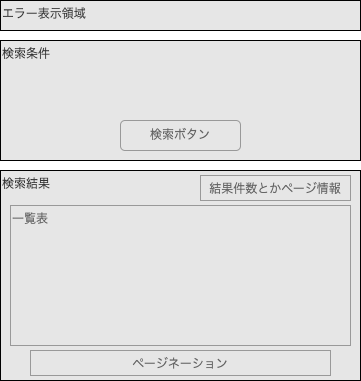
と言うわけで雰囲気でコード書いてみたのがこちら。
export type Ok<T> = { _tag: "Ok"; ok: T };
export type Err<E> = { _tag: "Err"; err: E };
export type Result<T, E> = Ok<T> | Err<E>;
export const Result = Object.freeze({
  Ok: <T, E>(ok: T): Result<T, E> => ({ _tag: "Ok", ok }),
  Err: <T, E>(err: E): Result<T, E> => ({ _tag: "Err", err }),
});

export interface SearchHandler<T, R, E> {
  search(condition: T): Promise<Result<R[], E[]>>
  clear(): void
}

export function useSearch<T, R, E>(handler: SearchHandler<T, R, E>){
  const [results, setResults] = useState<R[]>([]);
  const [errors, setErrors] = useState<E[]>([]);
  const [isLoading, setLoading] = useState(false);
  const [isSearched, setSearched] = useState(false);
  const search = async (condition: T) => {
    setLoading(true);
    setSearched(true);
    const ret = await handler.search(condition);
    if(ret._tag === 'Ok') {
      setResults(ret.ok);
    } else {
      setErrors(ret.err);
    }
    setLoading(false);
  };
  const clear = async () => {
    setErrors([]);
    setResults([]);
    setSearched(false);
    await handler.clear();
  }
  return { search, clear, results, errors, isLoading, isSearched };
}
(※ 上記のResult型はStackOverflowで見かけたコードのコピペ)
使う側はというと、雰囲気こんなイメージ。(Xxxは何らかのエンティティだと思ってください)
const XxxSearchHandler: SearchHandler<XxxCondition, XxxResult, XxxError> = {
  search: async (
    condition: XxxCondition
  ): Promise<Result<XxxResult[], XxxError[]>> => {
    return await findXxxData(condition);
  },
  clear: async (): Promise<void> => {},
};

const XxxSearch = () => {
  const { search, results, errors, isLoading, isSearched } = useSearch<
    XxxCondition,
    XxxResult,
    XxxError
  >(XxxSearchHandler);
  const onSearch = async (condition: XxxCondition) => {
    await search(condition);
  };
  return (
    <>
      <ErrorComponent errors={getErrorMessages(errors)} />
      <XxxConditionComponent onSearch={onSearch} />
      {!isLoading && isSearched && <XxxResultComponent results={results} />}
      {isLoading && <Spinner />}
    </>
  );
};
こんな感じで、XxxSearchと言うContainer Componentと、検索のロジックを記述するXxxSearchHandlerと、あとはPresentation ComponentとしてのXxxConditionComponent, XxxResultComponentに分けられる。
Presentation Componentはpropsにのみ依存してて基本的に描画のみする。
まあConditionComponentにはフォームが含まれるので描画のみってわけにもいかないけど、検索ボタン押した時にprops.onSearchを呼ぶ、というところだけ守って実装しておけば、どんな風に書いてもOK。実際にはuseHookFormとか使うしバリデーションもそこに書く。
ディレクトリ構成は
features/
  Xxx/
    XxxConditionComponent.tsx
    XxxConditionComponent.test.tsx
    XxxResultComponent.tsx
    XxxResultComponent.test.tsx
    XxxSearch.tsx
    model.ts
みたいな感じで近くにまとめておくと良さそう(※XxxSearchHandlerはXxxSearch.tsxに含める)
という思いつきで、実際にプロジェクトで運用したわけでもないけど、何ならビルドすらしてないけど、どうかしら?
その後、いちおうビルドできることは確認しました。
https://github.com/yosiopp/react-search-demo